Someone clicks an ad. Then what? They might land on the website, tap a WhatsApp button, save an enrolment, pay for a class, or leave. An ad-click total cannot tell you which of those things happened.
For Jardella, I built an internal ads tracker to make that next part visible. It brings Meta campaign reporting alongside website activity, saved enrolments and recorded payments. The useful part is being able to inspect the steps separately.
"A click is an event. A paid enrolment is another event. The reporting needs to preserve that difference."
Two sources of evidence
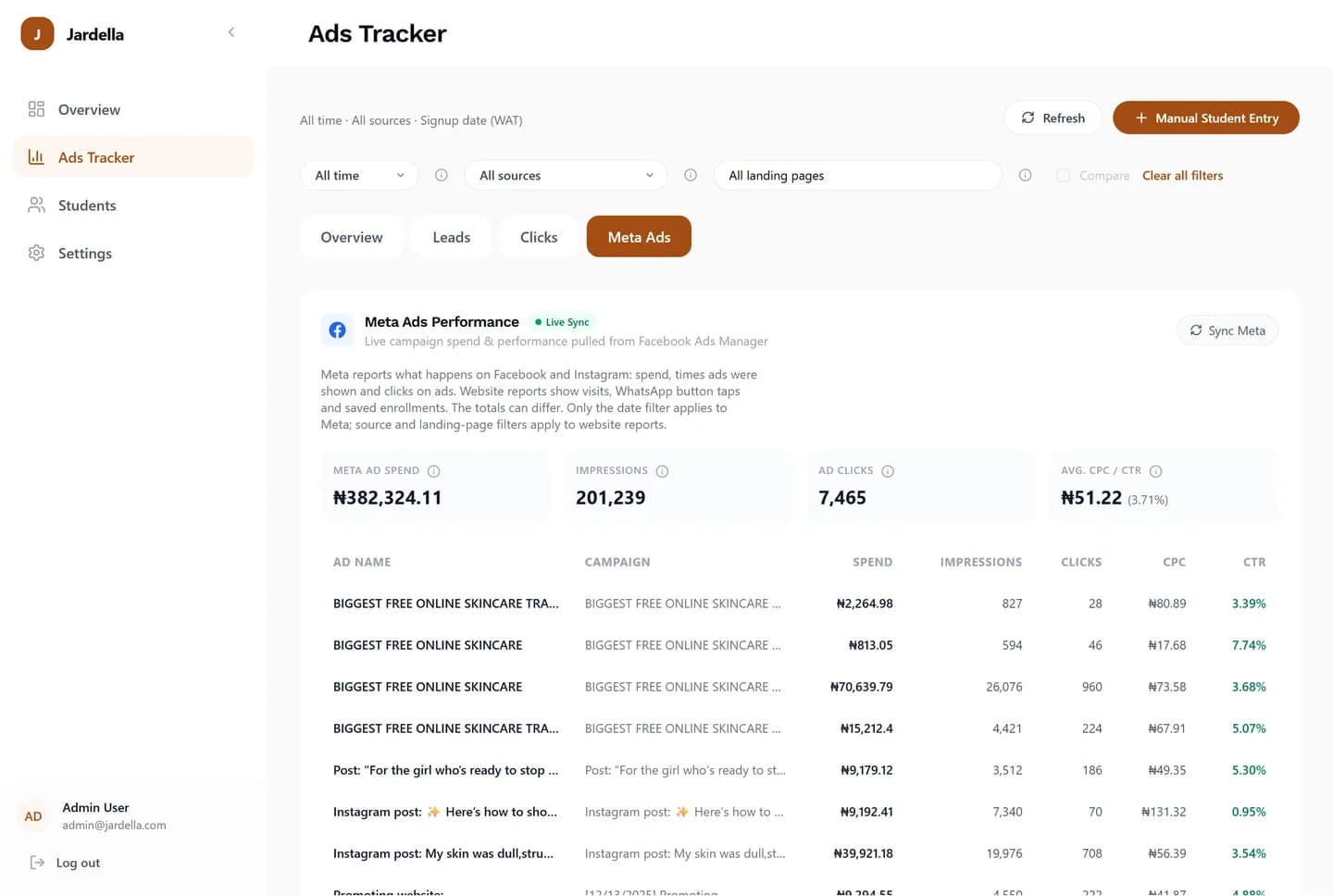
The Meta view reports campaign spend, impressions, ad clicks, CPC and CTR. The website views report tracked visitors, WhatsApp button taps, saved leads and payment statuses. Those are different datasets answering different questions.
The dashboard explains that its Meta view and website reports have different filter scopes: the date filter applies to Meta, while source and landing-page filters apply to website reporting. Keeping that distinction visible matters when someone compares the numbers.
The build behind the dashboard
I used Python and FastAPI for tracking, Supabase for login, and integrations with Meta and Paystack. Together, those parts support an internal tool where the team can investigate activity beyond a headline campaign metric.
The framework is only one part of the explanation. The reporting also needs to make clear what was recorded, which source it belongs to and what conclusion someone can reasonably draw from it. Here is how the dashboard separates the journey.
1. A tracked visit
The landing-page report groups website activity by route. It puts tracked visitors alongside WhatsApp clicks, saved leads and paid records, so the team can investigate a page rather than treating all traffic as one total.
That gives a more specific question to ask: which landing pages are associated with the actions the business cares about? It also keeps website activity distinguishable from ad-platform engagement.
2. A signal of intent
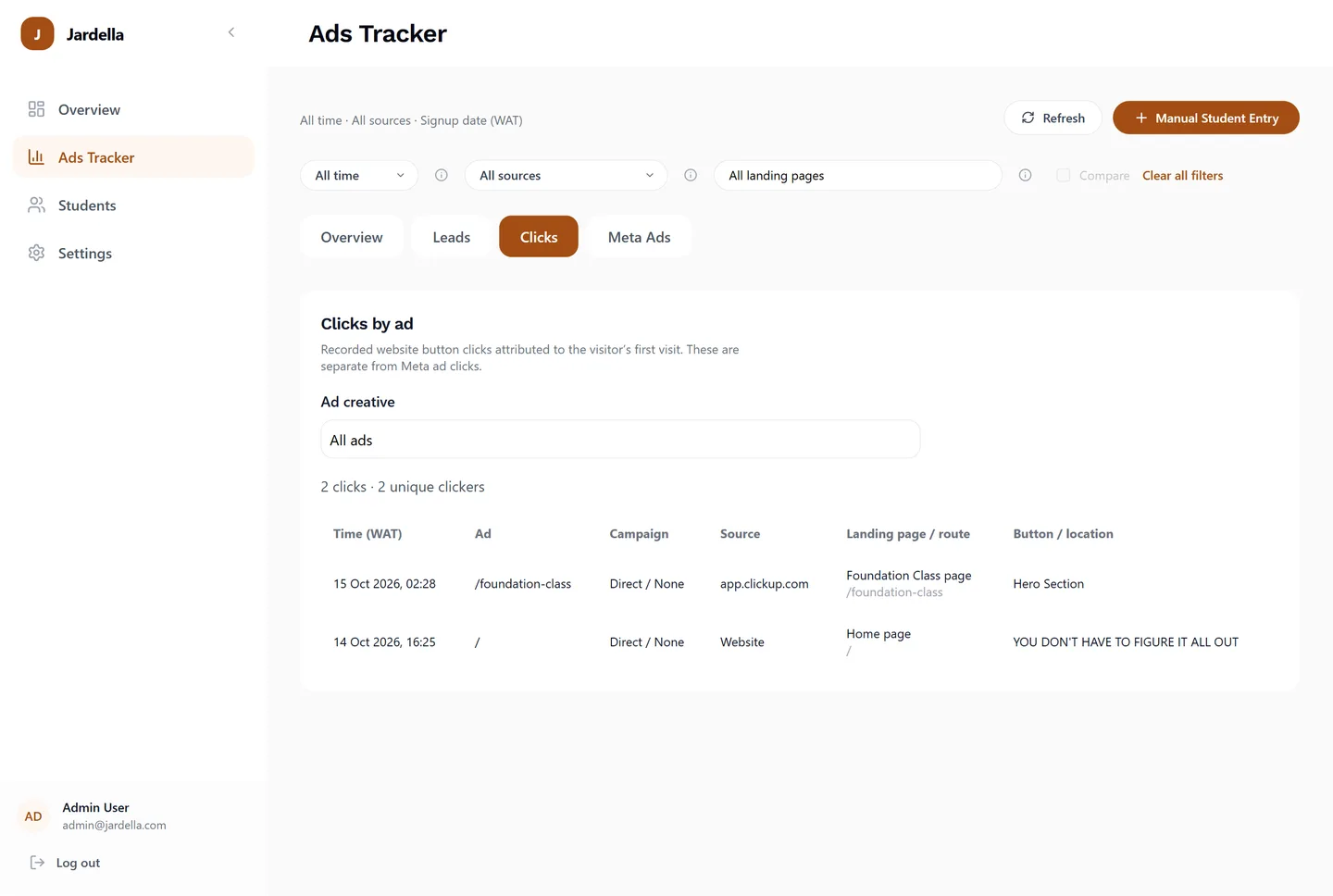
A WhatsApp button tap is useful evidence of interest. It does not confirm that a message was sent, a conversation happened or a payment followed.
The click report exposes the time, source, campaign, landing route and button location. Its explanation states that website button clicks are attributed to the visitor’s first visit. That context is more informative than a total with no explanation of where it came from.
3. A saved lead
A saved enrolment gets its own place in the reporting. It is a different record from a website visit or a button tap, with its own class and status information.
Older or manually entered records can have an unknown source. The dashboard keeps that uncertainty visible. A record with missing attribution should not quietly become evidence for whichever campaign someone wants to credit.
4. A recorded payment
Paystack is part of the payment integration. The dashboard separately shows paid records, pending payments and recorded revenue. This gives the team a way to compare recorded outcomes with earlier activity.
The distinction still matters at this stage. A pending payment is not a completed payment, and a paid record is not by itself proof that an ad caused the purchase. A useful report lets the reader see the status and attribution that are actually available.
A journey with more than one path
These stages are a way to read the evidence, not a compulsory sequence for every customer. Someone can enrol without tapping WhatsApp. Another person can tap the button and leave. Manual entries may have no recorded landing page at all.
The internal tool supports several views of that activity: landing-page comparisons, click logs, saved enrolments, payment statuses and Meta campaign reporting. Each view adds context to the others without making the measurements interchangeable.
- Ad engagement: what Meta reports about campaign activity.
- Website activity: visits and button interactions recorded on the site.
- Saved leads: enrolment records with their own status and available source context.
- Recorded outcomes: paid and pending records, plus recorded revenue.
What the screenshots demonstrate
The screenshots show the reporting interface and the distinctions it exposes. Their figures are point-in-time records. They are not a claim that I increased sales by a particular percentage, or that every reported visit can be matched perfectly to an ad click.
That is the backend story I want this project to tell: how a business can investigate what happened after the click, with enough context to understand what the numbers mean.