A dashboard is useful when it helps someone understand what needs attention and what they can do next. A collection of attractive totals is only part of that job.
The Staff Portal project brings Zoho-backed tasks and operational information into a mobile-first interface. Jardella is a different internal tool: it helps the team investigate website activity, enrolments and recorded payments. Together, they show why internal tools need both backend context and careful interface decisions.
Put the daily task in view
The Staff Portal screenshot leads with task information: an overdue warning, in-progress and completed counts, filters, and an assigned task. The task area includes a status control and a due-date area. That makes the immediate work visible before someone has to explore the rest of the navigation.
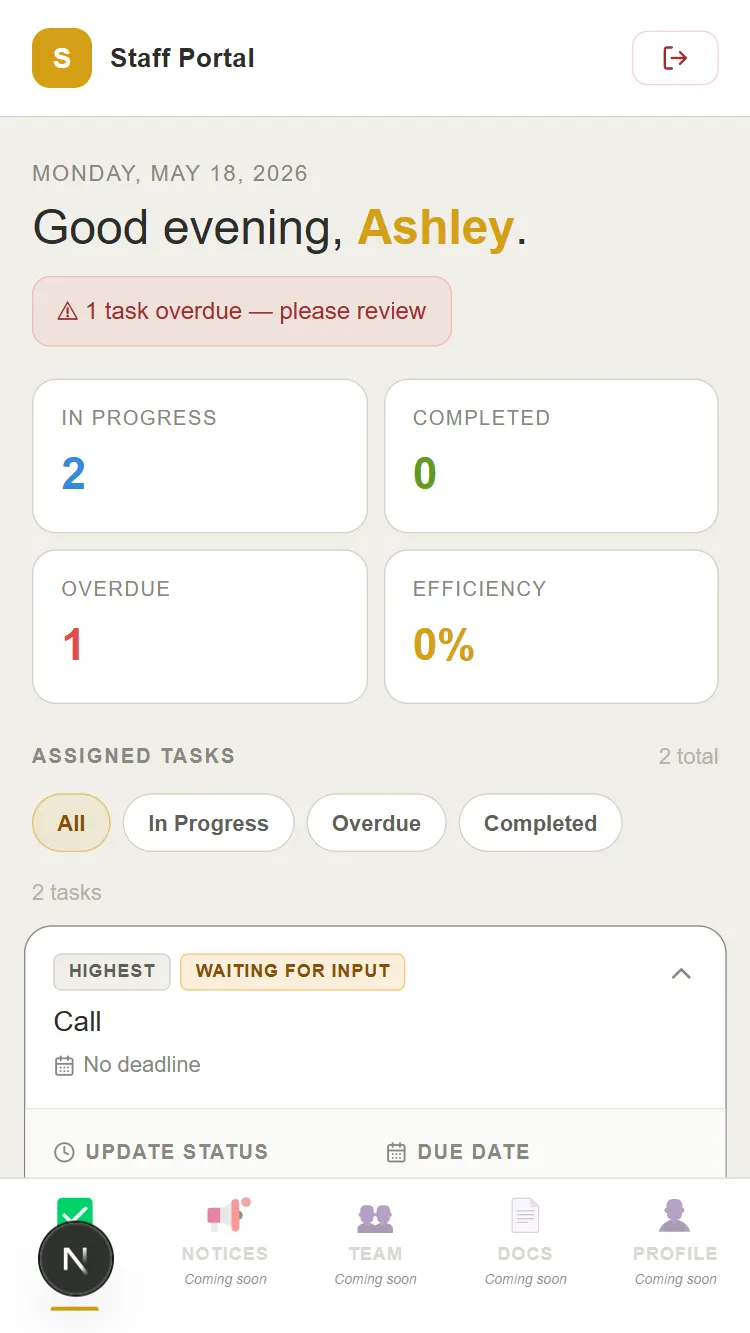
The same screenshot marks several navigation items as coming soon. It would be misleading to present every tab as a completed feature. A product walkthrough should distinguish the task interface that is shown from the wider areas that are planned.
Use the backend context the person needs
The Staff Portal case study describes a Next.js and React interface integrated with Zoho APIs. The purpose of that layer is to bring staff-relevant information into a focused experience, rather than requiring every person to navigate the underlying tools in the same way.
Jardella needs a different set of distinctions. A tracked visit, a WhatsApp tap, a lead and a recorded payment each mean something different. The interface makes those distinctions visible through separate reports, explanatory text and status information.
A number needs an explanation
For a task dashboard, the reader needs to know which work is overdue or in progress. For an attribution dashboard, the reader needs to know what the total counts and which filters affect it. The definition can be as important as the visual emphasis.
- Label the state or measurement in plain language.
- Put the most relevant next action close to the record.
- Show enough context for someone to investigate a total.
- Make missing or unknown information visible.
- Keep planned functionality distinguishable from what is available.
Mobile-first work changes the layout questions
The Staff Portal was designed for mobile use. Its screenshot uses stacked task summaries, readable labels and a task-focused area. On a smaller viewport, the order matters: the warning, the task summary and the relevant record need to remain easy to find.
When reviewing a similar interface, I would ask whether the person can identify the important state, reach the relevant action and understand its result at the viewport they actually use. Those questions are more specific than asking whether a dashboard looks modern.
Show the system through the interface
These projects give me a way to explain full-stack work through something a reader can inspect. The Staff Portal connects an interface to operational data through APIs. Jardella connects reporting to distinct types of business activity. The screenshots provide evidence of those interfaces, while the case studies explain their context.
A strong internal-tool story identifies the person, the record and the action involved. That makes the work easier to assess than a list of frameworks alone.