A business process often crosses several tools before anyone calls it a workflow. A booking can arrive in one place while the information needed by another team lives somewhere else. Automation connects those handoffs, but the handoffs still need to make sense.
My portfolio includes Zoho Flow integration work and an n8n automation project. The work covers triggers, API connections, data mapping and branching logic. It is useful backend evidence because the result depends on how systems exchange information, not just how a screen looks.
Map the business process before the boxes
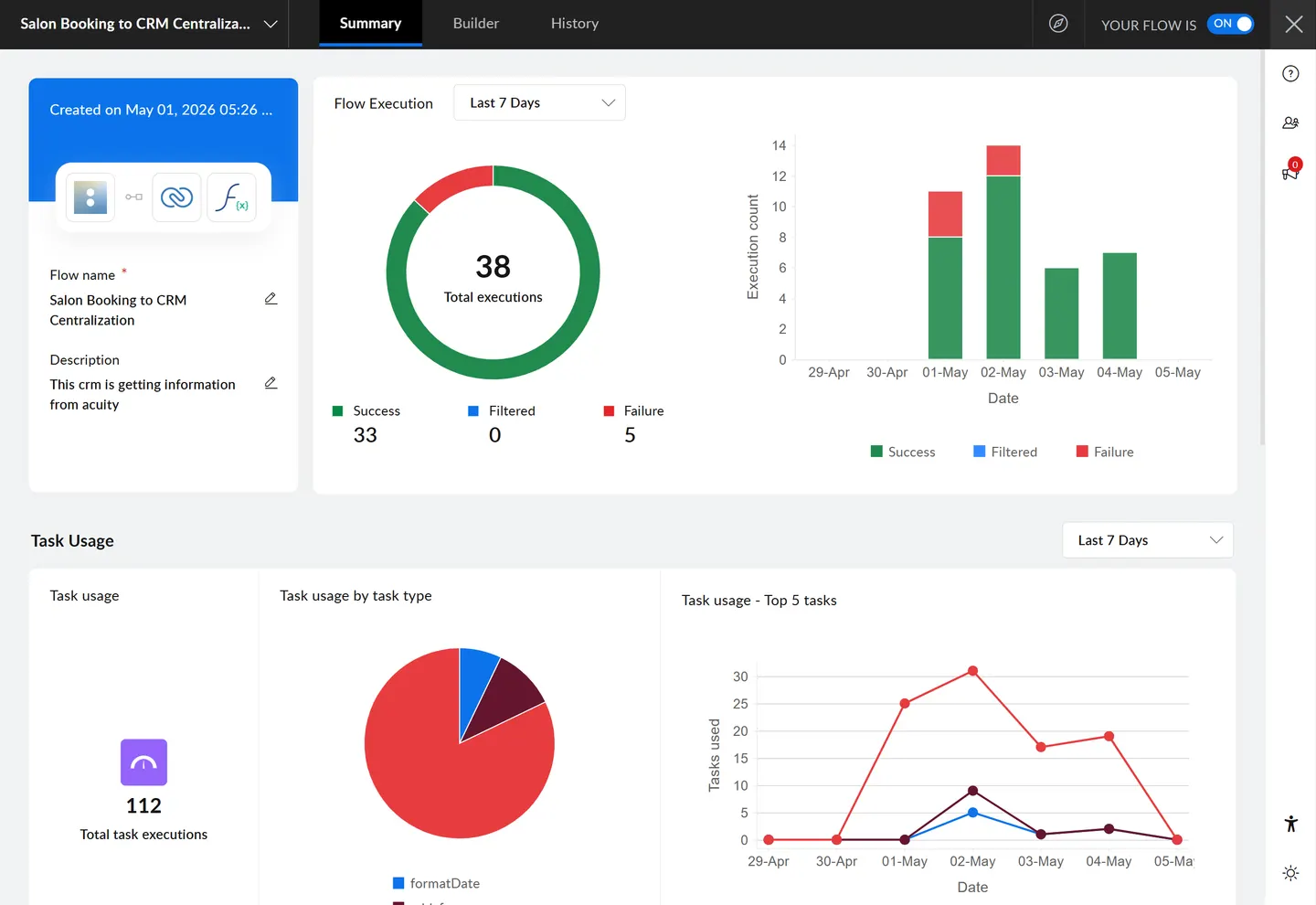
The Zoho Flow case study describes mapping processes visually and standardising data between platforms. A concrete example visible in its screenshots is a salon-booking-to-CRM centralisation flow, whose description identifies Acuity as the information source.
Before extending a flow like that, useful questions include what starts the process, which record is being moved, what the destination expects and how someone will recognise the result. The tool can draw an arrow; the developer still has to explain why the arrow is there.
Data mapping is a meaningful part of the work
Two systems can describe the same business concept using different field names or formats. A booking handoff needs a clear interpretation at both ends. A field that is missing also needs an explicit outcome rather than disappearing into a generic success total.
- Source: what information is available when the trigger runs?
- Mapping: which fields carry the meaning the destination needs?
- Action: what should the destination create or update?
- Visibility: where can someone inspect the result?
- Failure: what information would help a person investigate?
Execution history belongs in the story
The Zoho Flow screenshot shows both successful and failed executions. That is a point-in-time view of a workflow, not proof that failures never happen. It makes execution visibility a more useful subject than promising a perfectly invisible system.
For someone maintaining an integration, the ability to identify what ran and what needs attention is valuable. A failure record gives the next investigation a starting point: which execution needs attention, what data arrived and where the handoff stopped.
Different tools, shared engineering questions
The n8n project in my portfolio documents webhook listening, organised branching and execution/payload inspection. Zoho Flow provides another environment for connecting business tools. The recurring questions are about inputs, transformations, side effects and visibility.
Each integration still needs its own handling of incomplete inputs and unexpected outcomes. Keeping the process map, field mapping and execution evidence understandable helps the next person investigate a failed handoff.
Connect automation to the people using it
An automation is easier to explain when the reader can see which business handoff it supports. In the booking-to-CRM example, the screenshot gives that handoff a name. In the staff portal, the related challenge is presenting operational information in a form the team can use.